Shopify Pricing Apps: How to Evaluate One
The Shopify App Store lists well over a hundred apps under "pricing optimization," and the overwhelming majority of them are discount, bundle, or flash-sale tools wearing a pricing label. Before you install anything, it's worth knowing what you're actually buying: a tool that executes a promotion you already decided on, or a tool that helps you decide what the right price is in the first place. This guide covers the questions worth asking, the real difference between a discount app and a pricing intelligence tool, how margin floor protection works, how to judge whether a tool's recommendations are trustworthy, and what setup actually requires. For the vendor due-diligence questions that apply beyond just the App Store listing, red flags in a demo, trial length, contract terms, what to ask a pricing software vendor before you buy covers that ground.
Discount App vs Pricing Optimization Tool: The Real Difference
A discount app executes a promotion you've already decided to run, a percentage off, a bundle price, a flash sale, a volume tier. It's a tool for applying a markdown you chose, not a tool for figuring out what your price should be in the first place.
A pricing optimization tool does the opposite job: it helps you decide what your base price should be, using cost data, demand data, or margin targets. That's a meaningfully different function, even though both categories get filed under the same "pricing" label on the Shopify App Store.
The category listing itself makes the imbalance obvious. Scroll through the apps under Shopify's pricing optimization category and the overwhelming majority are volume discount tools, bundle builders, flash sale schedulers, and bulk price editors. These are useful tools for what they do, but what they do is execute a decision you've already made, not help you make it. Genuine pricing intelligence, tools that tell you what a product's price should actually be based on data rather than a rule you configured yourself, is a much smaller slice of that category than the label suggests.
A quick way to tell which one you're looking at
Ask one question: does the app change how much a customer pays as part of a promotion you configured, or does it recommend what your underlying price should be based on data it analyzed? If it's the former, discount, bundle, tiered pricing, flash sale, it's a discount app, regardless of what the App Store listing calls itself. If it's the latter, an actual recommendation grounded in your sales history or cost structure, it's a pricing intelligence tool. Your pricing model matters more than which category name an app filed itself under.
| Question | Why it matters |
|---|---|
| Does it show its data source? | A recommendation based on your own sales history is a fundamentally different claim than one based on generic category assumptions or a competitor's price. |
| Can you set a hard margin floor it won't cross? | Prevents stacked discounts or a bad recommendation from selling below your actual cost. |
| Does it explain why it's recommending a change? | A number with no visible reasoning is harder to trust and harder to catch if the underlying data is wrong. |
| Can you test a recommendation on a small scale first? | Validating on one product or a short window is a lower-risk way to build trust in a new tool. |
| Does it stay current automatically? | A tool that needs manual reconfiguration every time costs or sales patterns shift adds ongoing work rather than removing it. |
Can a Pricing App Set a Floor So It Never Goes Below Your Margin?
Yes, and this is a specific, well-documented mechanism, not a vague safety claim vendors make without substance behind it.
Margin floor protection works by checking any proposed price change against a formula before it executes. A common baseline formula is cost times a minimum multiplier, for example, cost x 1.10 as a floor that guarantees at least a 10% margin on top of cost regardless of what discount or promotion is layered on top. If a proposed price, after any stacked coupons or promotional rules, would fall below that floor, the change is blocked before it reaches the customer.
This matters most in situations where multiple discount mechanisms can stack unexpectedly, a coupon code combined with an automatic volume discount, for instance, can produce a final price nobody explicitly approved. Without floor protection, a single SKU can spiral toward break-even or worse across repeated promotional cycles, since each individual discount looked reasonable in isolation but the combination wasn't checked against the actual cost.
When evaluating a tool on this specific question, ask exactly how the floor is calculated (a fixed markup, a fixed dollar minimum, or your actual per-SKU cost data) and whether it's enforced automatically at the point of sale or only as a warning you'd need to notice and act on manually. Zorin's approach folds margin data into the recommendation itself: a raise, lower, or hold suggestion already reflects your actual cost structure, rather than generating a price first and requiring you to separately configure a floor to catch a mistake after the fact.
How Do You Know If a Pricing Tool's Recommendations Are Actually Reliable?
A star rating and review count are a reasonable starting signal, but they're a weaker check than two things that matter more directly: whether the tool tells you how confident it is in a specific recommendation, and whether you can validate a recommendation before trusting it across your whole catalog.
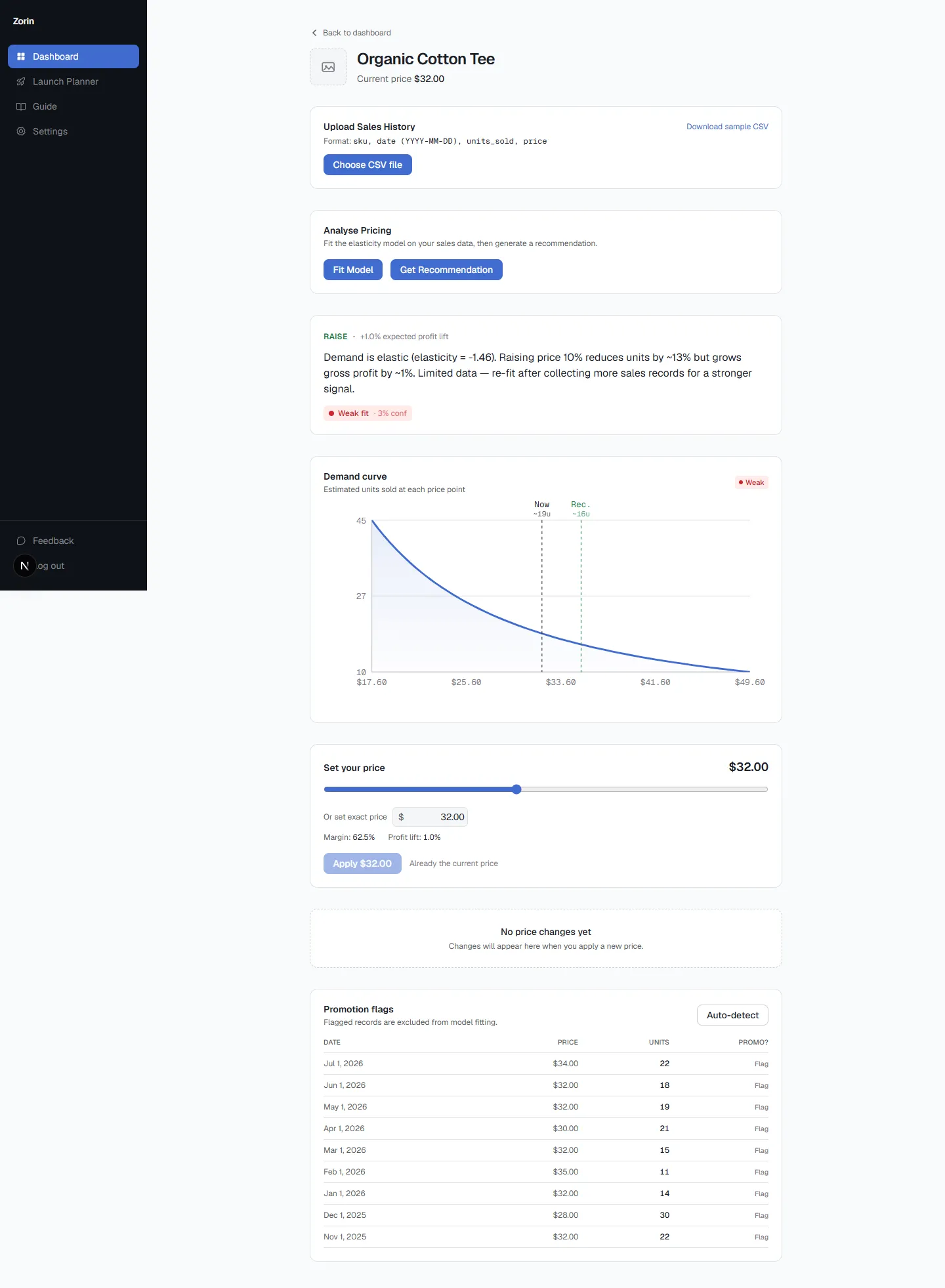
Confidence signaling. Not every recommendation a pricing tool generates rests on equally solid data. A product with six months of sales history and real price variation supports a much more reliable estimate than a product that launched three weeks ago. A tool that presents every number with the same flat confidence, without distinguishing a well-supported recommendation from a thin-data guess, is asking you to trust things it can't actually verify itself. Look specifically for whether a tool labels its own confidence level per recommendation rather than delivering every number with identical, unearned certainty.
Validation before commitment. The lower-risk way to trust a new pricing tool is to test a recommendation on a small scale, one product, a short time window, before applying its logic across your full catalog. Price-testing approaches that let you preview a change end-to-end before it goes live, rather than requiring a leap of faith on day one, are a meaningful trust-building feature worth checking for.
Review count nuance. A 5-star rating built on three reviews is a materially weaker signal than a 4.7-star rating built on six hundred. When comparing tools by their App Store rating, weight the review count as much as the star average, since a small sample can look perfect by chance in a way a large one can't.
Zorin's confidence label (Strong, Moderate, or Weak) is a direct answer to the first check: it tells you explicitly whether a given SKU's recommendation is backed by sufficient, clean sales history, rather than presenting every product's suggestion with the same borrowed certainty. The elasticity confidence guide covers what each confidence tier means and what to do differently at each level.
Do You Need a Developer to Set Up a Pricing App?
For most Shopify pricing apps, including Zorin, no. Setup is typically a store connection through Shopify's standard app installation flow, followed by configuration inside the app's own interface, not custom development work. You connect your store, the app reads your existing sales and product data, and you're working within its dashboard from there.
The exception tends to be enterprise-tier margin protection or highly customized pricing rule engines, which are sometimes quoted per store with a more involved onboarding process and pricing that requires contacting sales directly rather than a self-serve signup. If a tool's pricing page says "contact sales" instead of showing a visible plan and price, that's usually a signal the setup is more involved than a standard app install, worth factoring into your evaluation if speed to launch matters to you.
For a straightforward pricing intelligence tool reading your existing Shopify or WooCommerce sales data, expect to be live and seeing recommendations within your own account without needing outside technical help. Start a free trial to see what a real recommendation looks like against your own catalog.
See what Zorin's elasticity model says about your own catalog.
Start free trialRepricer vs. Elasticity Model: A Worked Comparison
Say a competitor drops their price on a similar product from $30 to $26.
| Competitor Repricer | Elasticity-Based Tool (Zorin) | |
|---|---|---|
| What it reacts to | The competitor's price move | Your own historical demand curve, unaffected by a competitor's single move |
| Typical response | Auto-drops to $26 or slightly under | No automatic change; recommendation stays grounded in your own elasticity estimate |
| Risk | Can trigger a race-to-the-bottom price war with no regard for your own margin data | Recommendation reflects what your actual customers will pay, not a reaction to a rival |
Neither approach is wrong for every use case, but they answer different questions. A repricer answers "what is the market doing." An elasticity tool answers "what will my customers actually pay."
Testing Before You Trust It With Your Whole Catalog
- Upload your full sales history for a handful of your best-tracked products first, ones with real price variation in the past.
- Check the confidence score before acting on any recommendation, not just the raise/lower/hold call itself.
- Use the what-if simulator to sanity-check a recommendation against a price you'd expect to work, before applying it.
- Apply one product at a time initially, and watch whether the actual outcome tracks the projected lift.
- Expand to the rest of your catalog once you trust the pattern of recommendations against real results.
The trust-building step matters more than any single feature. The value of an AI-assisted recommendation holds up because you can see the reasoning and test it before it goes live, not because you're asked to believe it on faith.
Once you've picked a tool, check whether your current prices are too high or too low. Running WooCommerce instead? The same criteria apply, with a few platform-specific differences. For a breakdown of every tool category, see the full 2026 pricing tools comparison.
What Software Buyers Get Wrong
Capterra's 2026 Software Buying Trends report, based on more than 3,300 buyers, found only one in three is a successful software adopter, and 89% of buyers who regretted a purchase had run into problems during implementation. For a pricing app, implementation is when the tool first meets your real sales data, which is exactly why the testing sequence above matters. Keeping the final say also helps adoption: research by Dietvorst, Simmons and Massey found people are far more willing to rely on an imperfect algorithm when they can adjust its output.
Key Takeaways
- Most "pricing" apps on the Shopify App Store are discount execution tools, not pricing intelligence. Ask whether an app recommends what your price should be, or just applies a promotion you already decided on.
- A useful evaluation checklist covers data source, safety, explainability, and testability. Where does the recommendation come from, is there a margin floor, does the tool explain itself, and can you validate before committing.
- Margin floor protection is a specific mechanism, not a vague promise. It checks a proposed price against a formula (often cost times a minimum multiplier) and blocks anything that would breach it.
- Confidence labeling and small-scale validation matter more than a star rating alone. A tool that tells you how reliable a specific recommendation is, and lets you test before committing fully, is more trustworthy than one presenting every number with equal certainty.
- Most pricing apps, including Zorin, don't require a developer to set up. Watch for "contact sales" pricing as a signal that a tool's setup is more involved than a standard self-serve install.
Frequently Asked Questions
What questions should I ask before buying a pricing app for my Shopify store?
Ask where its recommendations come from (your own sales data vs generic assumptions), whether you can set a hard margin floor it won't cross, whether it explains its reasoning or just presents a number, whether you can test a recommendation on a small scale before rolling it out fully, and whether it stays current automatically or requires ongoing manual reconfiguration.
What's the difference between a discount app and a real pricing optimization tool?
A discount app executes a promotion you've already decided on, a percentage off, a bundle, a flash sale. A pricing optimization tool helps you decide what your underlying price should actually be, based on cost or demand data. Most apps filed under Shopify's "pricing optimization" category are the former; genuine pricing intelligence tools are a smaller subset.
Can a pricing app set a price floor so it never goes below my margin?
Yes, this is a real and specific feature, typically implemented as a formula (commonly cost times a minimum multiplier) that any proposed price is checked against before it executes. If a discount or price change would fall below that floor, the tool blocks it. Ask a vendor exactly how their floor is calculated and whether it's enforced automatically or just flagged as a warning.
How do I know if a pricing tool's recommendations are actually reliable?
Check two things beyond the star rating: whether the tool labels its confidence in each specific recommendation (distinguishing well-supported estimates from thin-data guesses), and whether you can validate a recommendation on a small scale before trusting it across your whole catalog. A tool that presents every number with identical certainty regardless of the underlying data quality is a weaker signal than one that's upfront about its own confidence.
Do I need a developer to set up a pricing app, or can I do it myself?
For most Shopify pricing apps, no developer is needed. Setup is typically a standard Shopify app install followed by configuration through the app's own dashboard. Enterprise-tier or highly customized margin protection tools, often the ones with "contact sales" pricing instead of a visible self-serve plan, tend to involve more setup complexity.
Are Shopify App Store ratings a reliable way to judge a pricing app?
They're a reasonable starting signal but incomplete on their own. Weight the review count alongside the star average, since a 5-star rating built on a handful of reviews is a much weaker signal than a slightly lower rating built on hundreds. A high rating with very few reviews is worth treating cautiously.
What's the risk of using a discount app when I actually need a pricing tool?
The main risk is that a discount app has no independent view of whether your underlying price is right in the first place, it only executes whatever markdown rule you configure. If your base price was already too low or too high, stacking discount automation on top of it doesn't fix that, and repeated discounting without a margin floor can erode profitability over successive promotional cycles.
Is there a difference between a pricing tool and a competitor repricer?
Yes. A competitor repricer adjusts your price in response to what competitors are charging, most common on marketplaces like Amazon where buy-box position depends on price. A pricing intelligence tool like Zorin, by contrast, models your own product's demand from your own sales history rather than reacting to competitor movement. The elasticity vs repricing software comparison covers this distinction in more depth, and whether a dedicated competitor tracking app is worth adding at all is worth answering before you evaluate either category.
The Shopify App Store makes nearly every pricing-adjacent app look like the same category. The real distinction that matters is whether a tool is executing a decision you already made or helping you make a better one in the first place, backed by your own data, a visible confidence level, and a margin floor that actually holds. Zorin reads your Shopify or WooCommerce sales history directly and builds all three into every recommendation it gives.
Written by Dexter
Dexter is part of the team at Zorin, building tools that help ecommerce merchants price with data instead of guesswork.
More in Pricing Tools & Software
View all →Best Dynamic Pricing Software for Ecommerce (2026)
Best dynamic pricing software for ecommerce compared: repricers, rule engines, price testing and demand-based tools, with 2026 prices and who each suits.
AI Pricing Software: How It Works and What to Ask
AI pricing software explained: the four types, how AI price optimization works, a worked example, the antitrust and model risks, and 8 questions to ask.
Pricing Intelligence vs Pricing Analytics Software
Pricing intelligence tracks competitors; pricing analytics reads your own sales. Which type of pricing software to buy first, and where Zorin fits.