Sync Zorin with your Shopify store
Connect once and Zorin keeps your catalog, orders, and prices in sync automatically - no manual re-import, no spreadsheets.
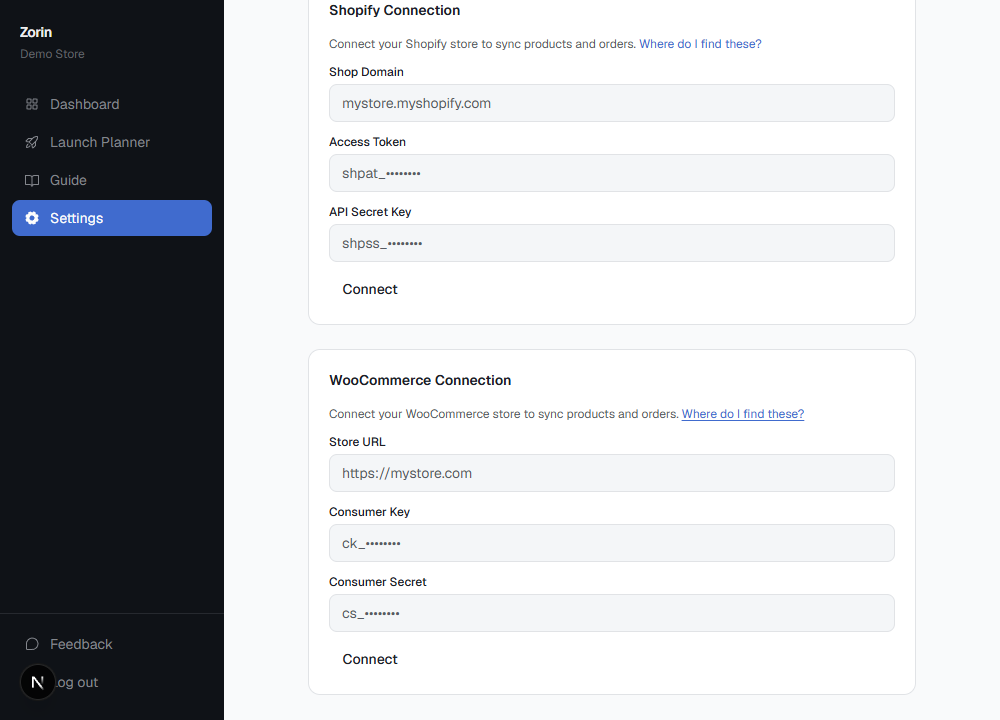
Video walkthrough coming soon - screenshot above shows the real connection screen.
How to connect
- 1In your Shopify admin: Settings → Apps → Develop apps → Create an app → configure Admin API scopes (read_products, read_orders, write_products).
- 2In Zorin: Settings → Shopify Connection. Paste your store domain and the Admin API access token from that app.
What stays in sync
- Products and prices - imported on connect, then kept current via real-time webhooks
- Orders - synced automatically as sales come in, feeding your elasticity model
- Price changes you apply in Zorin push straight back to your Shopify catalog
Shopify connection questions
Do I need a developer to connect Shopify?
No. Creating a custom app in your Shopify admin is a self-serve process that takes a couple of minutes, no code required. Zorin walks you through exactly which Admin API scopes to enable.
Will connecting Shopify slow down my store?
No. Zorin reads your data through Shopify's Admin API and webhooks, it never adds a script or app embed to your storefront, so page load speed for your customers is unaffected.
What happens to my existing order history?
Your full order history imports on the initial connection, which is what your elasticity model needs to fit properly. Zorin generally needs at least 6 months of history with some price variation to produce a confident recommendation.
Can I disconnect Shopify later?
Yes. Revoking the custom app's access in your Shopify admin, or removing the connection in Zorin's settings, stops the sync immediately. Your existing recommendations and data stay in your Zorin account.