How to Know If Your Prices Are Too High or Too Low
Most merchants find out their prices are wrong after the damage is already done. Sales dip and you don't know if it's the price or the season. Margin quietly erodes and you don't notice until the quarterly numbers come in. The only reliable way to know if a price is too high or too low is to measure how your own customers respond to it, which is exactly what price elasticity tells you, product by product, instead of leaving you to guess from gut feel.
The symptoms merchants usually reach for, declining sales, a suspiciously high close rate, a customer saying "wow, that's cheap", are all lagging indicators. By the time you notice them, you've already lost the sale, the margin, or both. What you actually want is a number you can check before you make the change, not after.
The Signs You're Priced Wrong (and Why They're Unreliable)
Every merchant has a mental checklist for spotting a bad price. The problem is that most items on it are ambiguous at best and misleading at worst.
Signs your price might be too low:
- Nearly every visitor who reaches checkout completes the purchase, with almost no hesitation or price objections.
- You're selling a healthy volume but still struggling to cover marketing, support, or restocking costs.
- Customers comment that your price "seems too good to be true" or ask if there's a catch.
Signs your price might be too high:
- Add-to-cart rates look fine, but checkout completion drops.
- Customers abandon carts specifically at the price or shipping cost step.
- You're consistently undercut in reviews or comparison threads by name.
Here's the catch: a high close rate could mean your price is too low, or it could mean your ads are just well-targeted. A cart abandonment spike could mean your price is too high, or it could mean a shipping fee surprised people at checkout. These signals point you in a direction, they don't give you a number, and they show up well after the sale was already won or lost.
What Price Elasticity Actually Tells You
Price elasticity of demand (PED) measures how much your sales volume moves when your price moves. The formula is simple:
PED = % change in quantity sold ÷ % change in price
Say you raise a product from $50 to $55, a 10% increase, and units sold drop from 200 to 160, a 20% decrease. Your PED works out to -2.0. Products with a PED above 1 (in absolute terms) are elastic, meaning demand is sensitive to price and a small change moves a lot of volume. Products below 1 are inelastic, meaning customers keep buying even as price shifts.
| Elastic demand | Inelastic demand | |
|---|---|---|
| What it means | Small price changes cause large swings in units sold | Units sold stay relatively stable even as price changes |
| Typical examples | Discretionary goods, items with easy substitutes | Everyday essentials, unique or hard-to-replace items |
| Pricing implication | Raising price risks losing meaningful volume | There's often room to raise price without losing many customers |
Knowing whether a SKU is elastic or inelastic changes what "too high" or "too low" even means for that specific product. A 10% price cut on an elastic product might genuinely pay for itself in extra volume. The same cut on an inelastic product mostly just gives away margin you didn't need to.
Why Competitor Prices Don't Answer the Question
The instinct when a price feels off is to check what competitors charge and match or undercut it. It's an understandable shortcut, but it doesn't actually answer whether your price is right for your customers.
A competitor's price was never calculated from your customers' behavior in the first place. It reflects their costs, their brand positioning, and their audience, not yours. They might be running thinner margins, subsidizing with a different revenue stream, or targeting a more price-sensitive segment entirely. Copying that number tells you nothing about what your specific buyers are actually willing to pay.
Your own sales history is the only data set that reflects how your customers respond to your prices. That's the read that actually matters, and it's the one most merchants have no realistic way to extract on their own across a full catalog.
See what Zorin's elasticity model says about your own catalog.
Start free trialHow to Get a Real Answer for Each SKU
Reading elasticity from raw sales data yourself is harder than it sounds. You need enough historical price movement to have something to measure, enough order volume for the read to mean anything, and a way to separate a real demand signal from noise like a holiday spike or a clearance sale. Miss any of those and you're not measuring elasticity, you're reading tea leaves.
This is where Zorin's mechanism comes in. You connect your Shopify or WooCommerce store, or upload a CSV of sales history, and Zorin fits a price elasticity model per SKU using your own historical price-and-quantity data. Each product gets one of three plain outputs: raise, lower, or hold, along with an estimated profit lift and a confidence label based on how much real data actually supports that read. Promotional spikes get automatically flagged and excluded from the model fit, so a discount weekend doesn't quietly distort the baseline number.
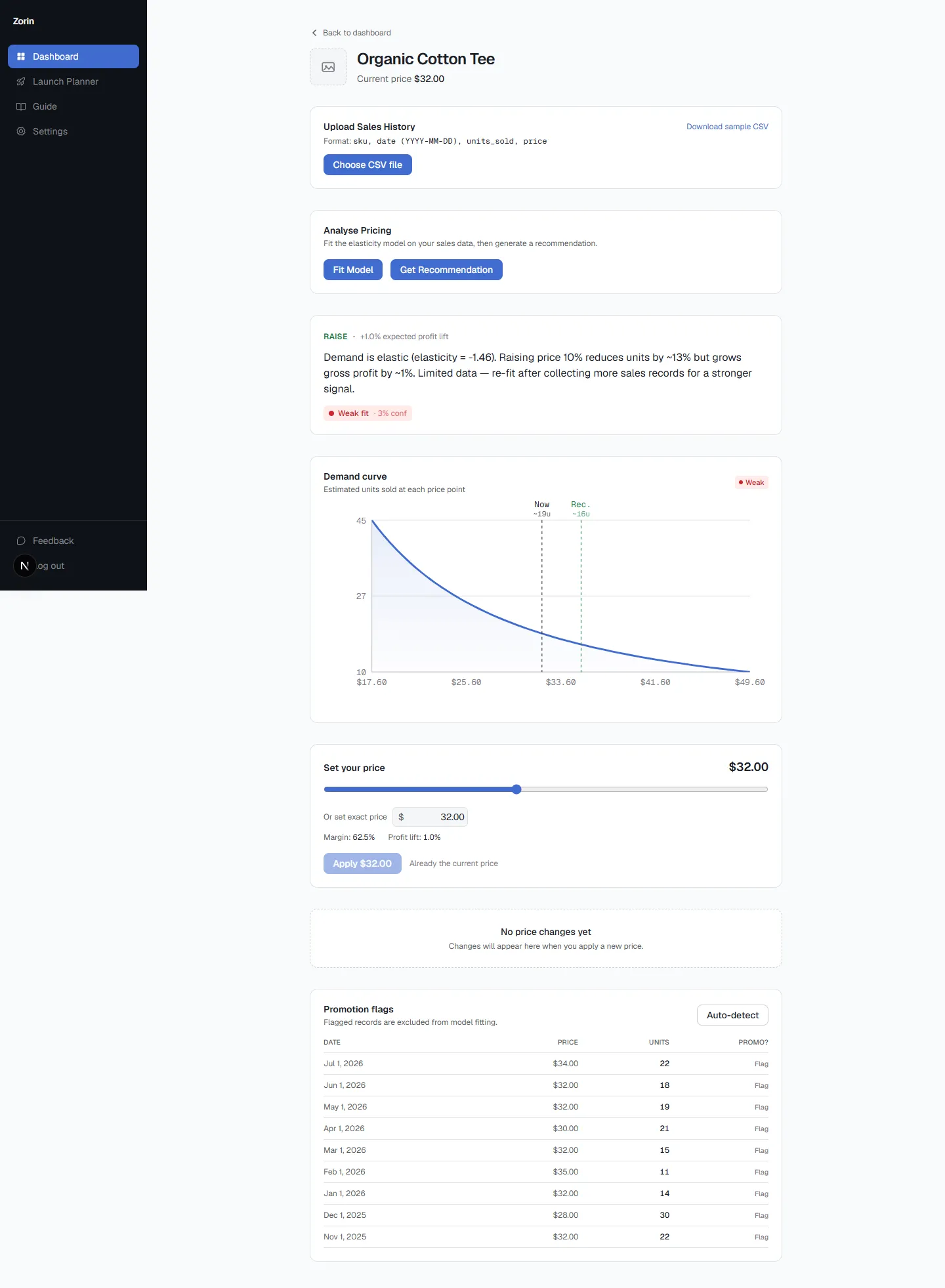
The confidence label matters as much as the recommendation itself. A product with six months of solid price variation and consistent volume gets a strong-confidence read. A product you've never actually changed the price on gets a lower one, honestly labeled as such instead of dressed up with false certainty. That distinction is exactly what a symptom checklist can't give you: it tells you not just what to do, but how much to trust the answer before you act on it.
What to Do Once You Know Your Price Is Off
Once you have an elasticity read and a direction, the size of the move matters. McKinsey's analysis of S&P 1500 companies found that a 1% price increase, with volume held steady, produced roughly an 8% increase in operating profit, a bigger impact than an equivalent cut in variable costs or a 1% gain in sales volume (McKinsey). Small, well-placed price moves carry outsized leverage on the bottom line, which is exactly why guessing at the size of the move is expensive in both directions.
Before applying anything, it helps to preview what a price change actually does to your margin and estimated profit, not just assume it'll work out. Zorin's what-if simulator lets you adjust a recommended price with a slider or type your own number and see the resulting margin impact before committing. You can apply a change to a single product to test the read, or roll it out across your whole catalog at once, with each product's apply working independently so one failure doesn't block the rest.
Nothing changes automatically. You're the one deciding whether to act on a raise, lower, or hold recommendation, Zorin's job is just making sure you're deciding from a real number instead of a guess.
Key Takeaways
- Common symptoms of a bad price (declining sales, a high close rate, cart abandonment) are lagging and ambiguous, they show up after the sale is already won or lost.
- Price elasticity measures how much sales volume moves when price moves, giving you a number to check before changing a price, not after.
- Whether a product is elastic or inelastic changes what "too high" or "too low" even means for that specific SKU.
- Competitor prices reflect someone else's costs and audience, not yours, so matching them doesn't answer what your own customers will pay.
- A confidence label matters as much as the recommendation itself, a thin-data estimate should be labeled as such, not presented with false certainty.
Frequently Asked Questions
What's the best pricing software for ecommerce sellers to optimize profit margins?
Look for a tool that reads your own sales history rather than just tracking competitors. Zorin fits a price elasticity model per SKU from your historical price-and-quantity data and returns a raise, lower, or hold recommendation with an estimated profit lift and confidence score.
How do I know if my product prices are too high or too low?
Symptoms like declining sales or a high close rate are lagging signals. The reliable way is measuring price elasticity, how much your sales volume shifts when price shifts, for each product using your own sales history.
Is there a tool that tells me the price elasticity of my products?
Yes. Zorin connects to Shopify or WooCommerce, or accepts a CSV of sales history, and fits a per-SKU elasticity model automatically, no data science background required.
How can I raise my prices without losing sales on Shopify?
Start with products that show inelastic demand, meaning volume holds steady even as price moves. Check the elasticity and confidence level before the change, then preview the margin impact with a what-if simulator before applying it.
What's the best AI pricing tool for Shopify stores with large product catalogs?
For catalogs with dozens or hundreds of SKUs, look for per-SKU modeling rather than one blanket rule. Zorin fits an individual elasticity model to each product and supports bulk apply across the catalog, with each product's apply handled independently.
Should I price based on what competitors charge?
Competitor prices reflect their costs, brand, and audience, not yours. Your own sales history is the only data that shows how your specific customers respond to your prices.
How much sales data do I need before I can trust an elasticity estimate?
It depends on the product, but generally you need at least a few months of price variation and enough order volume to separate a real signal from noise. Zorin labels each recommendation's confidence based on exactly this, so you know how much to trust it.
Does raising a price always mean losing sales?
No. For inelastic products, demand often holds steady even as price rises, meaning a price increase can lift profit with minimal volume loss. Elasticity tells you which of your products behave this way.
What's the difference between watching competitors and reading elasticity?
Watching competitors tells you what someone else charges. Reading elasticity tells you how your own customers respond to your prices, which is the only signal that actually reflects your business.
Can I test prices manually instead of using a tool?
You can, but naive testing on too small a sample or too short a window often produces a false signal rather than a real one. A model that reads your full sales history and flags low-confidence estimates avoids that trap.
Guessing at a price is expensive in either direction, too low and you're quietly giving away margin, too high and you're losing sales you'll never see reported as "lost to price." The fix isn't a better checklist of symptoms, it's reading what your own sales history already knows. Start a free trial and see what your elasticity actually says about your next price move.
Written by Dexter
Dexter is part of the team at Zorin, building tools that help ecommerce merchants price with data instead of guesswork.
More in Price Elasticity
View all →How to Calculate Price Elasticity in WooCommerce
Where to find the data in WooCommerce Analytics, the midpoint formula on a real example, and why a pricing plugin isn't an elasticity read.
What Your Price Elasticity Score Actually Means
What your elasticity number means, how to know if it's solid enough to act on, and why products in the same category can have completely different scores.
Sales Dropped After a Price Increase? Here's Why
Sales dropped after a price increase? It usually comes down to one of three causes, each with a different fix. How to tell which one hit your store.