Price Management Software: A Buyer's Guide
Price management software is the system that stores, updates, approves and publishes your prices across every product and channel, and keeps a history of every change. At its simplest it replaces the spreadsheet and the one-by-one edits in your store admin; at the enterprise end it adds rules, approval workflows and optimization. Most online stores need it once they have hundreds of SKUs, more than one sales channel or frequent cost changes, but the part that matters most is not the automation, it's whether the prices going in are the right ones.
What Is Price Management Software?
A price management system is the single place where your prices live and change. Instead of editing each product in Shopify, WooCommerce, Amazon and a wholesale spreadsheet separately, you manage prices once and push them out. The category goes by several names, price management software, pricing management system, pricing automation software, but the core jobs are the same.
| Capability | What it does | Why it matters |
|---|---|---|
| Price list management | Stores retail, wholesale, regional and channel price lists in one place | No more conflicting prices across channels |
| Bulk updates | Changes hundreds of prices at once, by rule or by selection | A supplier cost increase takes minutes, not days |
| Rules and automation | Applies rules like "cost × 2.2, rounded to .95" or "never below cost + 15%" | Consistency, and a floor that protects margin |
| Approval workflows | Routes big changes to a person before they go live | Catches errors before customers see them |
| Channel sync | Pushes approved prices to your store, marketplaces and feeds | One change, published everywhere |
| Price history and audit trail | Records every change, who made it and when | You can see what a price change actually did to sales |
| Analytics and optimization | Recommends prices from demand, margin or competitor data | Moves from managing prices to improving them |
Price Management vs Price Optimization
These are often sold together but they solve different problems. Price management is about execution: getting the intended price onto every product and channel correctly, quickly and with an audit trail. Price optimization is about decision: working out what that price should be. A system that manages prices perfectly can still publish the wrong ones. For how optimization tools work, see price optimization tools.
Execution matters more than it sounds. Simon-Kucher's Global Pricing Study 2025 found that companies realize less than half of the price increases they plan. Some of that leakage is customer pushback, but some is simply poor execution: increases applied late, to the wrong products, or undone by discounts nobody tracked.
Who Actually Needs a Price Management System?
- You have hundreds of SKUs or more. Editing prices one by one becomes slow and error-prone.
- You sell on more than one channel. Your own store, Amazon, wholesale and marketplaces each need the right price, often a different one.
- Your costs change often. Tariffs, freight and supplier increases mean frequent repricing.
- More than one person changes prices. Without approvals and a history, nobody knows who changed what, or why.
- You've had a pricing error that cost money. Usually the clearest signal of all.
If you have 40 products on one Shopify store and change prices twice a year, your store's built-in bulk editor is probably enough. Our guide to pricing your whole catalog at once covers the lightweight approach.
Worked Example: What Manual Price Management Costs
A home goods store has 800 SKUs across Shopify and Amazon. A supplier raises costs 5% on 300 of them.
- Time: updating 300 products on two channels at about 2 minutes each is 1,200 minutes, or 20 hours of work, before any checking.
- Errors: at a 1% slip rate, that's 6 wrong prices. One of them is a bestseller entered at $4.99 instead of $49.99. It sells 20 a day and the error is caught after two days: 40 units × $45 undercharged = $1,800 lost.
- Delay: if the update takes two weeks to get through, the store absorbs the higher cost in the meantime. At 1,500 affected units sold in those weeks and $1.25 of extra cost each, that's another $1,875 of margin.
That's about $3,700 plus 20 hours from a single supplier change. A price management tool that updates by rule, flags any price more than 30% below the last one, and pushes to both channels in minutes pays for itself quickly in this situation.
See what Zorin's elasticity model says about your own catalog.
Start free trialAutomation Needs Guardrails
Automated pricing without limits can fail fast. In December 2014, a glitch in RepricerExpress, a tool that automatically adjusted Amazon sellers' prices to stay competitive, pushed prices for some UK sellers' stock down to a penny. Fortune reported one seller saw $15,000 of stock sold within 40 minutes. Any price management system you use should enforce:
- A hard floor per product, based on landed cost plus a minimum margin.
- A maximum step size, so no single update moves a price more than a set percentage without approval.
- Approval for exceptions, with a person reviewing anything outside the limits.
- An undo, with price history so you can roll back a bad update in one step.
How to Choose Price Management Software
| Segment | Typical buyers | Examples of the category | What to expect |
|---|---|---|---|
| Enterprise B2B price management | Manufacturers and distributors with complex quotes and contracts | Pricefx, PROS, Zilliant, Vendavo | Custom pricing, long implementations, deep workflow and deal management |
| Enterprise retail pricing | Large retailers with thousands of stores or SKUs | Revionics, Competera, Omnia Retail | Demo-led sales, competitor and demand modeling, onboarding projects |
| Ecommerce pricing apps | Shopify and WooCommerce stores | Bulk editors, repricers, price optimization apps | Self-serve, published pricing, narrower scope |
Questions worth asking any vendor:
- Which channels does it publish to, and how quickly?
- Can I set floors, step limits and approval rules per product or category?
- Does it keep a full price history I can export?
- Does it recommend prices, and if so, from what data?
- What does it cost, and is the price published or quote-only?
If you're a smaller store weighing whether any of this is worth paying for, pricing software for small business and the ROI math on pricing software go further.
Managing Prices vs Choosing Them
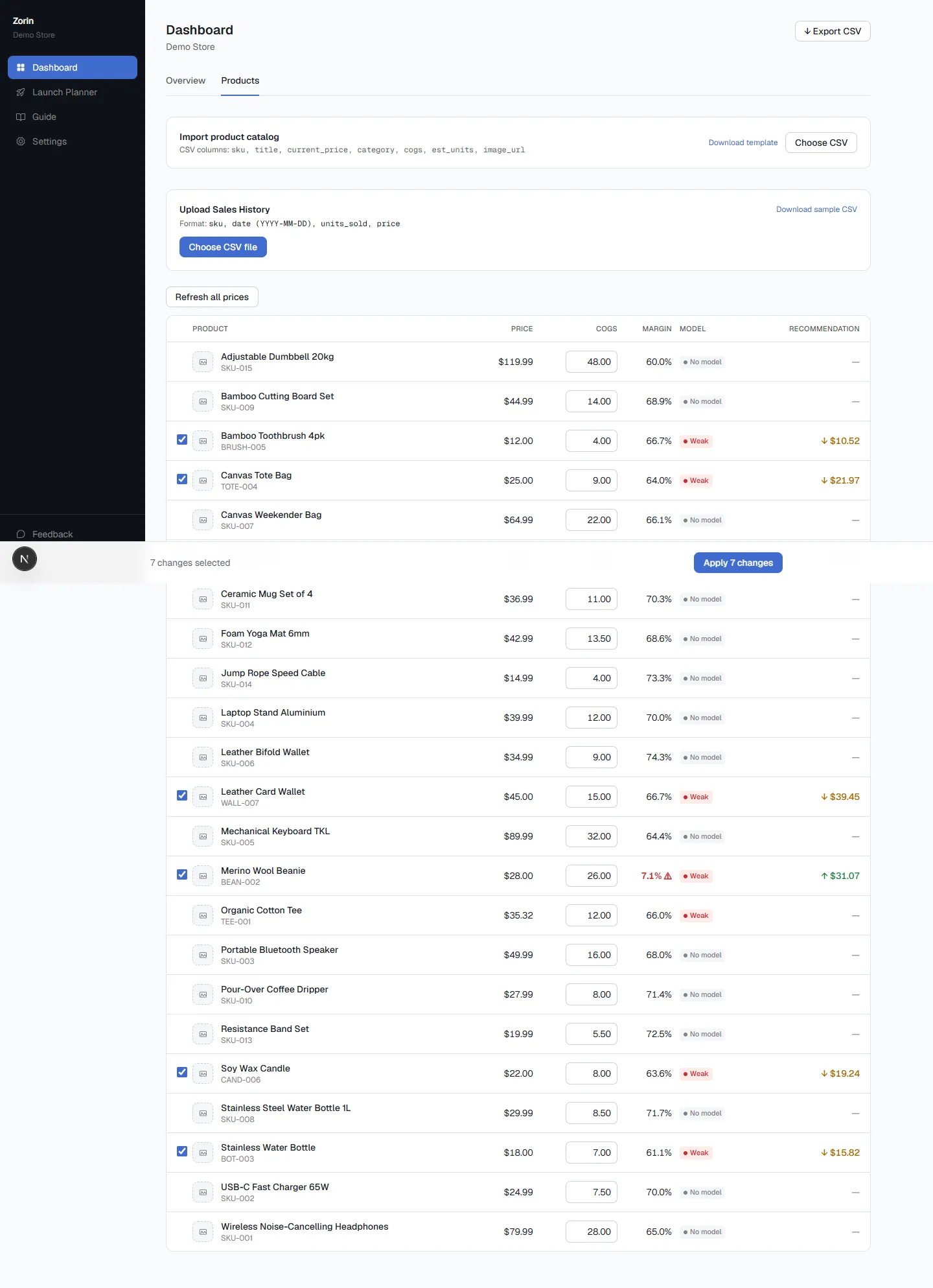
Zorin covers the decision side for Shopify and WooCommerce stores, with the execution basics built in. It fits a price elasticity model for each product from your sales history and recommends raise, lower or hold with an estimated profit impact and a confidence score. You can select many products and apply recommended prices in bulk, and approved prices are pushed back to your store. Every change sits alongside the sales it produced in the price history. It isn't an enterprise B2B quoting system, and it doesn't manage marketplace-specific price lists; it's built to make sure the prices you manage are the right ones.
Key Takeaways
- Price management software stores, updates, approves and publishes prices across products and channels, with a history of every change.
- Price management is about executing prices correctly; price optimization is about choosing the right ones.
- Simon-Kucher found companies realize less than half of planned price increases, and poor execution is part of the leak.
- In the worked example, one manual supplier update cost about 20 hours and $3,700 in errors and delay.
- Automation needs floors, step limits, approvals and an undo; a 2014 repricer glitch sold stock for a penny.
Frequently Asked Questions
What is price management software?
It's software that stores all your prices in one place, updates them in bulk or by rule, routes changes for approval, publishes them to your store and other channels, and keeps a history of every change.
What is the difference between price management and price optimization?
Price management handles execution: getting the intended prices onto every product and channel correctly. Price optimization handles the decision: working out what those prices should be, usually from demand, margin or competitor data. Some tools do both.
What is pricing automation software?
Pricing automation software applies price changes automatically based on rules or models, such as cost-plus formulas, competitor matching or demand-based recommendations. It saves time but needs floors, step limits and approvals to prevent costly errors.
Do small ecommerce stores need a price management system?
Not always. A store with a few dozen products on one channel can usually manage with its platform's bulk editor. Once you have hundreds of SKUs, several channels or frequent cost changes, dedicated software starts to pay for itself.
What features should price management software have?
At minimum: bulk updates, per-product price floors, channel sync, approval for large changes and a full price history. Optimization or recommendations are valuable if they're based on your own sales data and show how confident they are.
How much does price management software cost?
It ranges widely. Enterprise B2B and retail platforms are typically quote-only and involve implementation projects, while ecommerce pricing apps usually publish monthly plans. Compare the cost against the hours and pricing errors it would save.
Price management software keeps prices correct, consistent and traceable as your catalog and channels grow. Pair it with a clear view of which prices to set, and it stops being admin and starts adding profit. To get demand-based recommendations you can apply in bulk to your store, start a free trial of Zorin.
Written by Dexter
Dexter is part of the team at Zorin, building tools that help ecommerce merchants price with data instead of guesswork.
More in Pricing Tools & Software
View all →MAP Pricing Software: Monitoring & Compliance Guide
What MAP pricing software does, the legal frame, when manual MAP monitoring stops working, a 7-step compliance process and questions to ask vendors.
Best Dynamic Pricing Software for Ecommerce (2026)
Best dynamic pricing software for ecommerce compared: repricers, rule engines, price testing and demand-based tools, with 2026 prices and who each suits.
AI Pricing Software: How It Works and What to Ask
AI pricing software explained: the four types, how AI price optimization works, a worked example, the antitrust and model risks, and 8 questions to ask.