How to Run a Sale Without Wrecking Your Margin
The safest way to run a sale without wrecking your margin is to test the discount against your product's actual demand curve before applying it, and to make sure the promotional period gets excluded from your pricing data afterward so it doesn't distort future recommendations. Most of the damage from a bad sale isn't the discount itself, it's the corrupted signal that discount leaves behind in your sales history.
A Sale's Real Cost Has Two Parts
The obvious cost of a sale is the margin given up during the discount window. The less obvious cost is what that promotional period does to your pricing data afterward. A spike in sales at a low price during a sale doesn't reflect how customers behave at your normal price. If that spike gets treated as ordinary sales history, it skews your elasticity estimate going forward, and future recommendations end up built on a distorted picture of customer behavior.
What the Evidence Says About Deep Discounts
The clearest real-world data on small businesses running deep discounts comes from the Groupon boom. Rice University's Utpal Dholakia surveyed 150 businesses across 19 U.S. cities that had run a Groupon promotion, typically 50% off or more. About two-thirds said the promotion was profitable, but 32% said it lost money, and more than 40% said they wouldn't run one again. The businesses that lost money weren't unlucky. They offered a discount deeper than their margin could carry to customers who mostly never came back at full price.
The math behind that is simple and brutal. At a 40% gross margin, a 20% discount halves the profit on every unit, so you need to sell twice as many units just to stand still. How much to discount without losing your margin walks through that break-even calculation for any margin and discount depth. For context on what shoppers now expect, peak Black Friday/Cyber Week 2025 discounts ranged from about 19% on furniture to about 31% on electronics, according to Adobe's data in our discount depth by category research.
Test the Discount Before You Apply It
Rather than picking a discount percentage that feels aggressive enough to move inventory, a what-if simulator lets you preview the projected profit impact of a specific sale price against your product's actual demand curve, using elasticity calculated from your own sales history. If your data suggests demand is fairly inelastic for a product, a deep discount may cost you more in margin than it gains in volume. If demand is highly elastic, a meaningful discount can genuinely lift total profit, not just total units sold.
| Elasticity signal | What it suggests for a sale |
|---|---|
| Low elasticity (customers not very price-sensitive) | A deep discount likely costs more in margin than it gains in volume; a smaller discount may make more sense |
| High elasticity (customers very price-sensitive) | A meaningful discount can plausibly lift total profit through volume, worth testing with the simulator first |
Either way, the point is testing against your own data rather than picking a round number because it sounds generous. Once you've settled on the discount depth, how you present the resulting number (a round figure versus a .99 ending) is a separate, smaller decision.
Not Every Product Needs the Same Discount
Bestsellers already converting at full price rarely need a discount to move units, so discounting them mainly gives away margin you didn't need to give up. Slow-moving inventory has more room for a deeper cut, since unsold stock sitting in a warehouse often costs more over time than the margin given up to clear it. Treating every product in a catalog with one blanket discount percentage ignores this difference entirely.
See what Zorin's elasticity model says about your own catalog.
Start free trialFlag the Promotional Period, Don't Let It Slip Into Your Baseline Data
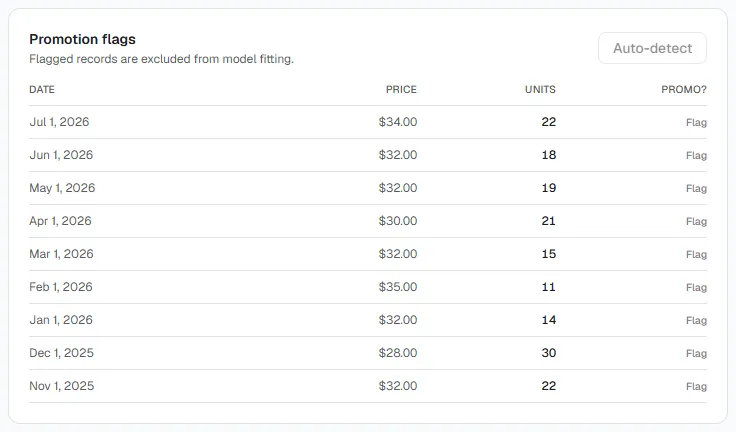
This is the step most sellers skip, and it's the one with the longest tail of consequences. If a sale period isn't excluded from the data your future pricing decisions are built on, it teaches the model, and effectively teaches you, the wrong lesson about how price-sensitive your customers really are. Promotional elasticity is typically higher than baseline elasticity: customers respond more aggressively to a visible discount than they would to the same percentage change at your regular price, and treating that as your normal elasticity overstates how much a future price cut would actually help.
Zorin's model automatically detects statistical outliers in your sales history, most commonly promotional spikes, and flags them for exclusion so your baseline elasticity estimate reflects ordinary buying behavior, not sale-week behavior. You can also manually confirm or override a flag if you know a spike had a different cause.
Watch for the Post-Sale Dip
A real pattern worth expecting: customers who stock up during a sale often reduce their normal purchasing for a period afterward, since they already bought what they needed at a discount. If you misread that natural dip as a sign your regular price is suddenly too high, you risk cutting a price that didn't actually need to change. Give the post-sale period a reasonable window before drawing conclusions from it.
Pricing Back Up When the Sale Ends
Resetting to "whatever it was before" without checking anything is a missed opportunity in one direction and a real risk in the other. If your baseline demand data (properly excluding the promo period) suggests the pre-sale price was already below the profit-maximizing point, the reset is a chance to correct that, not just restore the status quo. Run the same check you'd run on any price decision: does the current elasticity estimate, cleaned of promotional noise, support this specific number.
A Simple Sequence for Running a Sale
- Check elasticity before picking a discount instead of choosing a round percentage that feels right.
- Segment bestsellers from slow movers rather than applying one blanket discount catalog-wide.
- Use the simulator to preview projected impact at a specific sale price before it goes live.
- Let the promo period get flagged as an outlier once the sale runs, so it doesn't corrupt future recommendations.
- Give the post-sale period time before reading a temporary dip as a signal your regular price is wrong.
If you're pricing across more than one storefront, the same discipline applies per channel, see should you price differently on Shopify vs Amazon. And if you haven't checked your baseline elasticity recently, start with how to know what to price your products.
Three related situations worth a closer look: if you're trying to figure out how deep a discount can go before it eats into margin, see how much you should discount without killing your margin. If Black Friday or a similar seasonal event is what's prompting the sale, should you raise prices before Black Friday covers the legal and trust risks of inflating a price just to discount it back down. And if you want to measure a price change properly rather than just eyeballing before/after sales, how to run a price A/B test the right way covers the mechanics.
Key Takeaways
- A sale's biggest risk often isn't the discount itself, it's the corrupted pricing signal it leaves behind if the promo period isn't excluded from future data.
- Test a discount against your product's own demand curve before applying it, rather than picking a round percentage that feels generous.
- Promotional sales spikes should be flagged and excluded from your baseline elasticity, since customers respond more aggressively to visible discounts than to normal price changes.
- A post-sale dip in demand is often temporary (customers who stocked up buying less afterward), not a sign your regular price is wrong.
Frequently Asked Questions
How do I run a sale without wrecking my margin?
Test the discount against your product's actual demand curve before applying it, and make sure the promotional period gets excluded from your pricing data afterward so it doesn't distort future recommendations.
How do I decide which products to discount and by how much?
Check elasticity per product rather than applying one blanket percentage. Bestsellers usually need little or no discount; slow-moving inventory can typically absorb more. For inventory that needs to clear on a deadline rather than a single flash sale, a staged markdown down to a floor price is often a better fit than one deep cut, our free markdown and clearance price curve spreadsheet plans that schedule with the margin at each stage worked out automatically.
Do promotions mess up my future pricing recommendations?
Yes, if the promotional sales spike isn't excluded from the data. It inflates apparent demand at an artificially low price and can distort your baseline elasticity estimate going forward.
How does a tool know a spike in sales was a promotion and not real demand?
Statistical outlier detection flags unusually high sales relative to the fitted model as likely promotional activity, which you can confirm or override manually.
Why do sales sometimes dip right after a promotion ends?
Customers who stocked up during the discount often buy less than usual for a period afterward. That's a temporary pattern, not necessarily a sign your regular price is too high.
How do I price back up after a sale ends?
Check your baseline elasticity, with the promotional period excluded, against your planned reset price rather than assuming the pre-sale price is automatically correct.
Can I preview the impact of a discount before applying it?
Yes. A what-if simulator lets you test candidate sale prices against your product's demand curve and see the projected impact before anything goes live.
A sale's biggest risk usually isn't the discount you can see, it's the corrupted signal it can leave behind if the promotional period bleeds into your regular pricing data. Test the discount against your own demand curve, flag the promo period afterward, and give the post-sale window time before drawing conclusions from it.
Written by Dexter
Dexter is part of the team at Zorin, building tools that help ecommerce merchants price with data instead of guesswork.
More in Discounts & Promotions
View all →Which Products Should You Discount? Use Your Data
Discount the products whose demand actually responds to price, not whatever is overstocked. How to pick sale candidates from your own sales history.
Should You Raise Prices Before Black Friday?
Raising prices before Black Friday to fake a discount backfires with shoppers and regulators. How deep to actually discount for BFCM and keep margin.
How to Run a Price A/B Test the Right Way
Sample size, test duration, and how much to change the price. The mechanics of a real price test, no data scientist required.