Best Pricing Optimization Tools for WooCommerce (2026)
The best pricing tool for your WooCommerce store depends on the pricing question you're actually trying to answer. If you need to automate a discount rule you've already decided on, a dynamic pricing plugin like YITH handles that. If you need to watch what competitors charge, a tracker like Competiprice does that job. If you want to know what your own customers will actually pay, product by product, you need an elasticity tool like Zorin that reads your sales history directly.
WooCommerce still holds the largest share of the ecommerce platform market by store count, roughly 33.4% globally across 4.5M+ live stores, which also means it has the widest, most fragmented plugin ecosystem for pricing. Most of what gets filed under "WooCommerce pricing plugin" actually falls into three distinct categories that answer completely different questions. This guide breaks those categories down, names real tools in each, and gives you a framework for matching the right one to your store.
Why "WooCommerce Pricing Plugin" Means Three Different Things
Search the WordPress plugin repository for "pricing" and you'll get hundreds of results that mostly do one of three unrelated jobs. A rule-based dynamic pricing plugin executes a discount logic you configure yourself, quantity tiers, role-based wholesale pricing, cart-value thresholds. A competitor price tracker watches other stores and helps you react to what they charge. An elasticity tool reads your own sales history and tells you what your specific customers actually do when your price moves.
| Category | Data source | What it tells you | What it doesn't tell you |
|---|---|---|---|
| Rule-based dynamic pricing plugins | Rules you configure (quantity, role, cart value) | How to automate a discount logic you've already decided on | Whether that logic produces your optimal price |
| Competitor price trackers | Competitor websites and marketplaces | What others charge for similar products | Whether their price is right for your store |
| Demand-based elasticity tools | Your own sales history | How your specific customers respond to price changes, per SKU | What competitors charge (by design) |
Buying a tool in one category while expecting an answer from another is the single most common mismatch merchants run into when shopping for "pricing software" on WooCommerce.
Best Rule-Based Dynamic Pricing Plugins
If your pricing problem is executing a discount structure you've already designed, quantity breaks, wholesale role pricing, a cart-value threshold, these plugins are the right mechanism. They apply a rule, they don't calculate whether the rule is optimal.
YITH WooCommerce Dynamic Pricing and Discounts is the most established option, used by over 27,000 stores with a 4.5/5 rating. Its rule editor lets you stack multiple conditions in one rule, quantity and user role and day-of-week and category simultaneously, which makes it the strongest choice for genuinely complex discount logic. It runs $144/year for a single site, with no free tier.
Discount Rules for WooCommerce (FlyCart) is the most widely installed, with over 100,000 active installs. It ships a functional free version on WordPress.org, with premium starting at $85/year for more advanced conditional rules. For a store that needs straightforward tiered or role-based discounts without YITH's full rule-stacking complexity, this is the more budget-friendly starting point.
Advanced Dynamic Pricing (AlgolPlus) is the lowest-cost premium option that still covers serious bulk and tiered pricing scenarios, starting around $60/year with a free tier available. It's a reasonable pick for a smaller catalog that needs real rule depth without YITH's price tag.
All three execute logic you define. None of them tell you whether a 10% quantity discount is the right number, or whether a different threshold would protect more margin. That answer requires reading actual demand data, not configuring a rule.
Best WooCommerce Competitor Price Trackers
If your pricing problem is marketplace visibility or staying within a competitive band on commodity products, a competitor tracker is the right tool. Competiprice exports your WooCommerce catalog, lets you link competitor product URLs, and tracks price gaps from a single dashboard, built specifically for WooCommerce rather than adapted from a general ecommerce tool. Price Patrol offers AI-assisted competitor price monitoring with alerts and automated repricing rules from inside the WordPress dashboard.
Both tools read external data. They tell you what the market looks like and help you react to it. Neither tells you what your own customers would actually pay for your product at a different price, a fundamentally different question that requires a different mechanism entirely.
See what Zorin's elasticity model says about your own catalog.
Start free trialBest Tools for Reading Your Own Sales Data
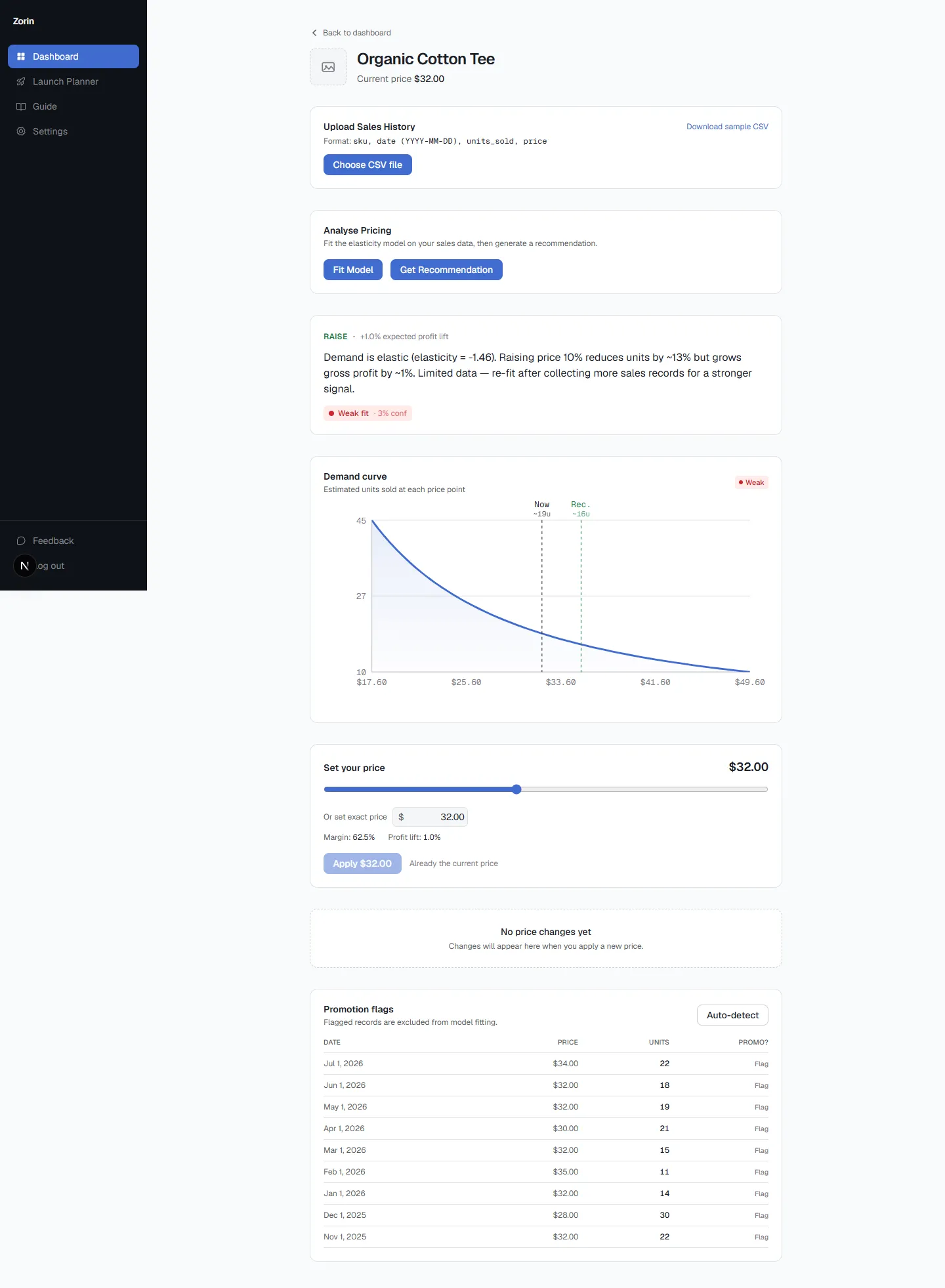
Elasticity modeling takes a different approach: instead of watching competitors or configuring a discount rule, it reads your store's own historical price and quantity data, fits a demand model per product, and tells you how your specific customers respond when price moves.
Zorin is the tool I'd point most independent and small-to-midsize WooCommerce merchants toward in this category. You connect your store or upload a CSV of sales history, and Zorin fits a log-log regression per SKU. For each product, you get a raise, lower, or hold recommendation with the elasticity coefficient, an estimated profit lift, and a confidence label reflecting how much real data and price variation actually back the estimate. A thin-data product is never presented with the same certainty as a well-established one, a distinction most rule-based plugins and trackers don't attempt to make at all.
Can You Just Use a Shopify Pricing App on WooCommerce?
No, and this trips up merchants who've researched Shopify tools before realizing they're on WooCommerce. Shopify apps run through Shopify's platform APIs and app infrastructure; they don't install on a self-hosted WordPress/WooCommerce site at all. Tools like Prisync or Intelligems that serve Shopify merchants have entirely separate WooCommerce integrations, or in some cases no WooCommerce support whatsoever, since the two platforms don't share a plugin architecture. Always confirm WooCommerce support specifically rather than assuming a Shopify-focused tool's marketing extends to your platform.
What's Missing From Most WooCommerce Pricing Plugins
Two gaps show up repeatedly across the rule-based category. First, none of them validate the rule itself, a plugin will happily execute a 30% quantity discount that quietly erodes margin on a low-margin product, because configuring the rule and evaluating whether the rule is a good idea are two different jobs, and these plugins only do the first one. Second, plugin security and maintenance track record matters more than most buyers check upfront. A widely-used WooCommerce dynamic pricing plugin was the subject of a documented JavaScript redirect injection vulnerability (patched in version 2.4.2, back in 2021), where malicious code stored in the plugin's settings created unauthorized admin accounts and redirected visitors to external sites. That's not a reason to avoid the category, it's a reason to check a plugin's update cadence and security disclosure history before installing anything that touches your storefront's pricing logic.
Key Takeaways
- "WooCommerce pricing plugin" covers three distinct mechanisms: rule-based dynamic pricing, competitor tracking, and elasticity modeling. Each answers a different question.
- YITH ($144/year, no free tier), FlyCart's Discount Rules (free tier, $85/year premium), and Advanced Dynamic Pricing (~$60/year, free tier) are the strongest rule-based options, but none validate whether the rule itself is optimal.
- Competiprice and Price Patrol track competitor prices specifically for WooCommerce, telling you what the market looks like, not what your own customers would pay.
- Zorin fits an elasticity model to your own sales history per SKU, with a confidence label reflecting how much real data backs each recommendation.
- Shopify pricing apps don't transfer to WooCommerce. Always confirm WooCommerce-specific support rather than assuming.
Frequently Asked Questions
What are the best pricing optimization tools for a WooCommerce store?
It depends on the job. YITH or FlyCart's Discount Rules for automating a discount structure you've designed, Competiprice or Price Patrol for competitor tracking, and Zorin for finding your optimal price from your own sales history.
What's the difference between a WooCommerce dynamic pricing plugin and a price elasticity tool?
A dynamic pricing plugin executes a discount rule you configure yourself. An elasticity tool calculates a recommendation from your own historical price and quantity data instead of following a rule, telling you how your specific customers respond to price changes per SKU.
Does WooCommerce have built-in pricing rules, or do I need a paid plugin?
WooCommerce's core doesn't include tiered, role-based, or conditional pricing rules natively. A plugin like YITH, FlyCart's Discount Rules, or Advanced Dynamic Pricing is required for that functionality, several offer a functional free tier before you need the paid version.
Can I use a Shopify pricing app on WooCommerce?
No. Shopify apps run through Shopify's own platform APIs and don't install on a self-hosted WooCommerce site. Look for a tool's WooCommerce-specific integration rather than assuming a Shopify-focused tool supports your platform.
What's missing from most WooCommerce dynamic pricing plugins?
They execute a rule without validating whether the rule itself is a good idea, and plugin security/maintenance track record varies widely. Check a plugin's update history and any past security disclosures before installing one that touches your live pricing.
Does Zorin work with WooCommerce, or only Shopify?
Zorin connects directly to WooCommerce or accepts a CSV upload of sales history, fitting the same per-SKU elasticity model regardless of platform.
For the deeper distinction between reading your own data and watching competitors, price elasticity vs repricing software covers that ground in full, and if you're weighing whether your catalog has outgrown manual discount rules entirely, rule-based vs algorithmic pricing walks through that threshold. Curious what Zorin's elasticity model says about your own WooCommerce catalog? Connect your store and see your first recommendation.
Most WooCommerce pricing confusion comes from treating three different tool categories as interchangeable. Know which question you're actually trying to answer, automate a rule, track a competitor, or find your real optimal price, and the right tool gets a lot easier to pick.
Written by Dexter
Dexter is part of the team at Zorin, building tools that help ecommerce merchants price with data instead of guesswork.